
Components and calculators
What the calculators are #
Six calculators design a single component or joint, rather than a whole beam-end connection. They use the same editor, checks, drawings, report and drawing sheet as the connection types.
| Calculator | What it designs | Basis | Design Examples reproduced |
|---|---|---|---|
| Bracket plate | A shaped plate on a column flange, bolted or welded, with an eccentric load | Manual Part 15, Parts 7 and 8 | II.A-22, II.A-23 |
| Bolt group | Any bolt pattern under an in-plane eccentric load at any angle | Manual Part 7 (IC and elastic methods) | II.A-24, II.A-25 |
| Weld group | A line, two lines, C, L or box fillet weld group (Manual Tables 8-4 to 8-11a) under an eccentric load | Manual Part 8 (IC and elastic methods) | II.A-26, II.A-27 |
| Bolted joint | A lap, splice, tee/flange or double-angle joint in shear, tension or both | AISC 360-22 J3, J4, J5 | J.3, J.4A, J.4B, J.5, II.D-3 |
| Welded joint | Fillet or PJP groove welds loaded at an angle, in a lap or tee joint | AISC 360-22 J2 | J.1, J.2A, J.2B |
| Pin-connected member / eyebar | A plate with a pin hole, or an eyebar, in tension, with one or more plies on the pin | AISC 360-22 D5, D6, J7 | D.7, D.8 |
To start one, choose New connection. In the wizard, pick a card under Components & calculators, give it a mark and choose Create. The calculator opens with the inputs of its first Design Example, so its first result can be checked against the published one.
Every calculator has:
- LRFD or ASD, and US or SI units. Changing the units converts every value.
- Loads as service D + L, a required strength, or every ASCE 7-22 combination. With combinations, each check reports its governing combination.
- A status of Adequate, Not adequate or Not feasible, using the same rules as the connections.
- Checks with their AISC clause and a fix hint, and the code-compliance list (see Checks and compliance).
- Two drawings with click-to-edit elements, plus the report and the drawing sheet in PDF and DXF (see Drawings and Reports).
Bracket plate calculator #
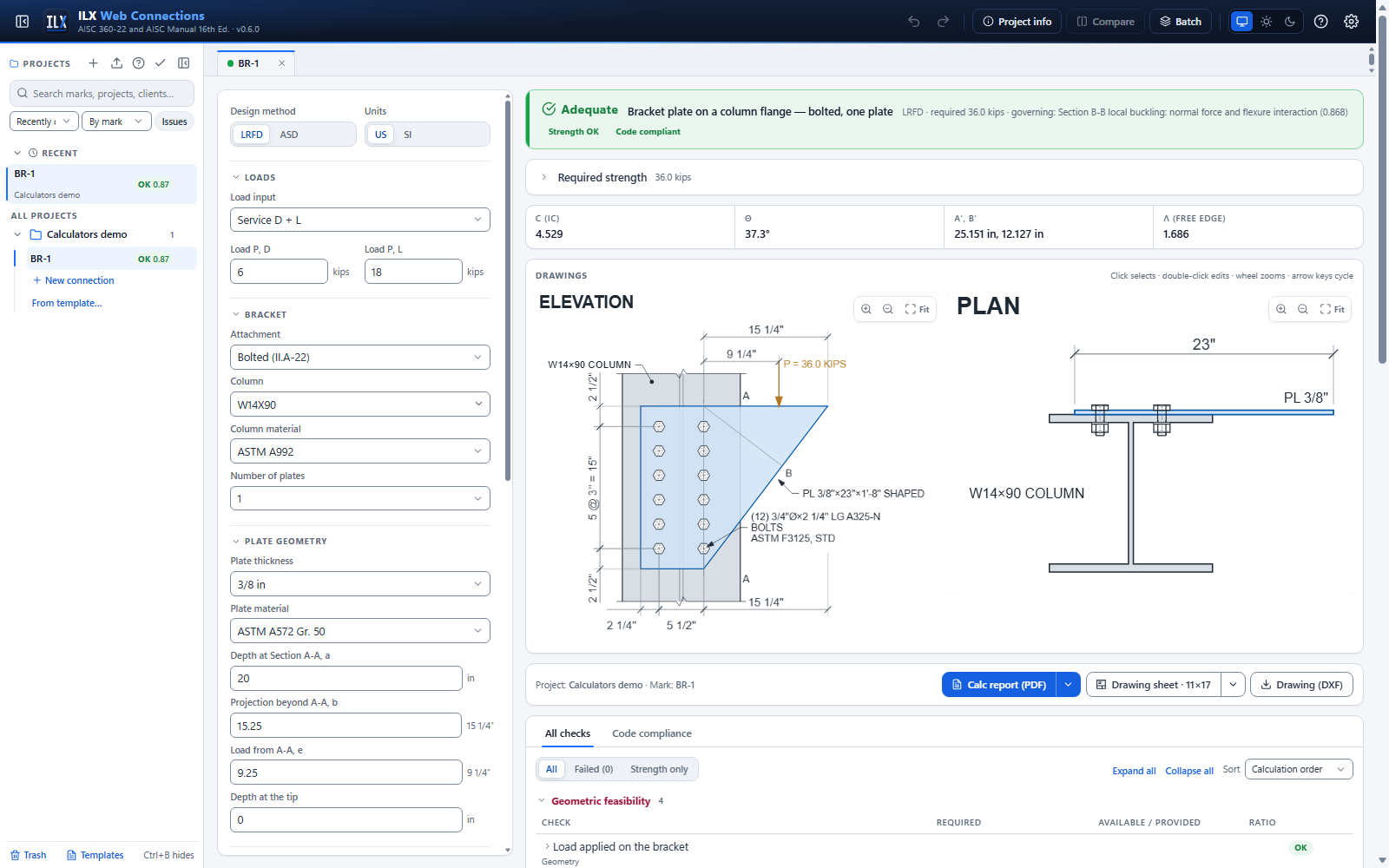
The plate is lapped on the column flange. Its depth at the attachment line is a. It projects a distance b beyond that line, to a tapered free edge. The load acts downward at e from the attachment line. With two plates, enter the total load. The plates share it, and every strength is for both plates.
Section A-A is the outer bolt line or, for a welded bracket, the end of the weld returns. ILX checks:
- flexural yielding, with Mn = Fy t a²/4 (Manual Eq. 15-2);
- flexural rupture through the holes (Eq. 15-3);
- shear yielding and shear rupture.
Net section chooses how the flexural-rupture section is calculated. Choose the holes as drawn, or Manual Table 15-2, which conservatively assumes a 1½ in. edge distance. Design Example II.A-22 uses Table 15-2.
Section B-B runs perpendicular to the free edge. ILX checks its shear yielding. It also checks local yielding or buckling of the free edge, with λ, Q and Fcr from Manual Eqs. 15-13 to 15-18, and the interaction Nr/Nc + Mr/Mc ≤ 1.0 (Eq. 15-10).
The attachment depends on how the plate is connected:
- Bolted. The bolt group is solved by the instantaneous-center method. Each bolt's strength is the least of its shear strength, plate bearing, plate tearout toward the top edge and column-flange bearing. ILX also checks block shear of the plate, the spacing and edge distances, the edge distance to the flange tip and the wrench clearance to the column web.
- Welded. The weld is a C-shaped group: the vertical weld plus returns along the top and bottom edges. ILX gives C, the required size Dmin (Manual Eq. 8-30), the minimum and maximum fillet sizes, and the base-metal thickness of the plate and the flange.
The column itself is assumed adequate, as in the Design Examples.
Bolt group calculator #
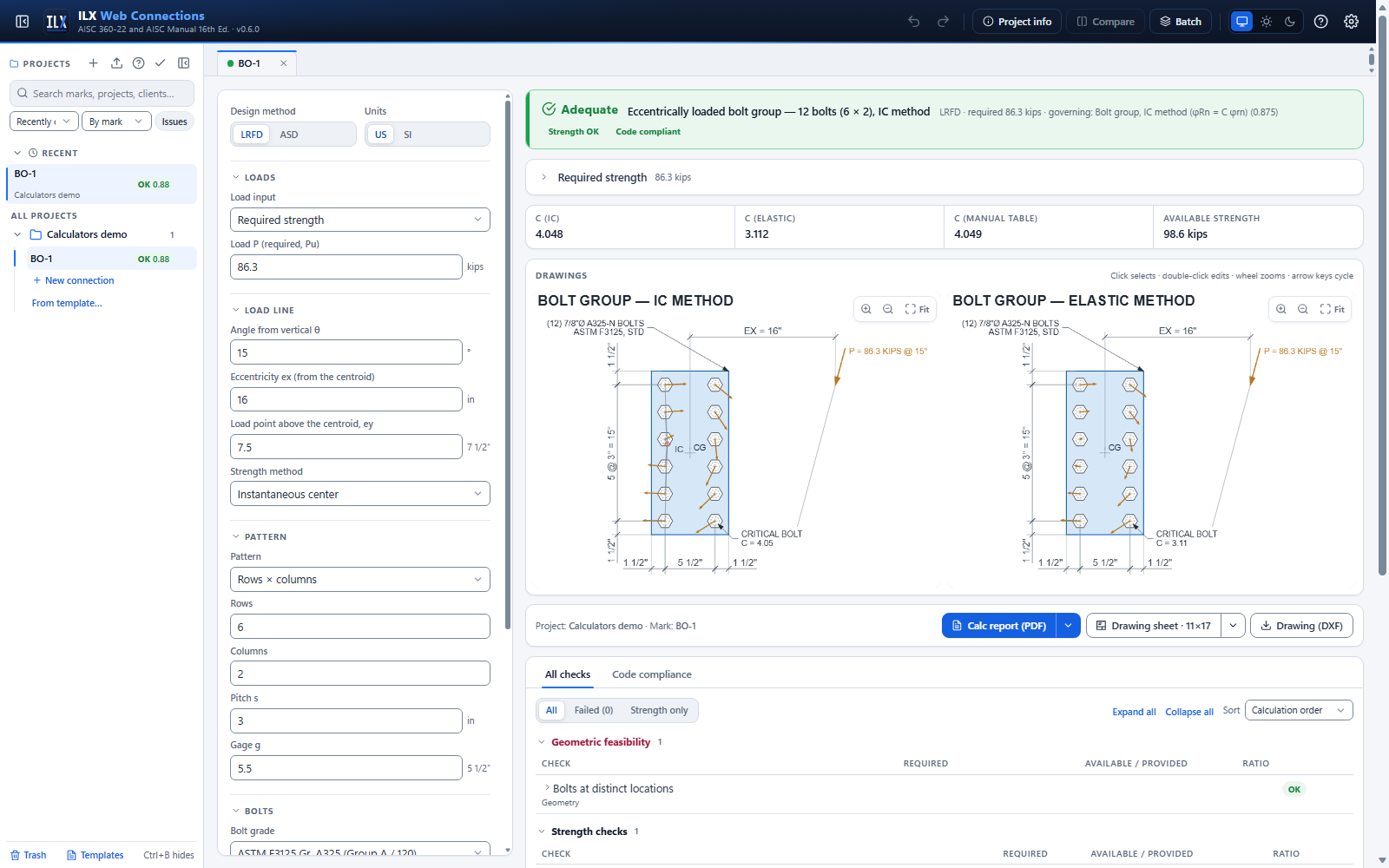
Enter the bolt pattern as rows × columns at pitch s and gage g, or as custom coordinates (one "x, y" pair per line).
The load acts at θ from the vertical, measured clockwise from straight down. Its line passes a distance ex to the right of the centroid, at a height ey above it. A load at 15° applied at the top bolt row (II.A-24, Solution B) is ex = 16 in., ey = 7.5 in. and θ = 15°.
| Result | Meaning |
|---|---|
| C (IC) | Instantaneous-center coefficient for the actual pattern and load line. The drawing shows the IC and every bolt force. |
| C (elastic) | 1/r of the critical bolt by the elastic method (Manual Eqs. 7-2 to 7-8). It is usually more conservative. |
| C (Manual table) | The value you would read from Manual Tables 7-6 to 7-13, interpolated between the tabulated eccentricities and angles. It is shown for comparison. Table 7-6 (one vertical row) starts at ex = 1 in., the other tables at 2 in. A test compares the IC method with every printed C of Tables 7-6, 7-7 and 7-8 (7,692 values): all agree within 1 % or 0.01, except a few printed values at 75°, s = 6 in., ex = 2 in. (up to 2.3 %). |
Strength method chooses which method sets the status. The other method is listed as a comparison. Bolt shear is calculated for any grade, threads N or X, and single or double shear.
To include bearing and tearout, enter the thinnest ply and its edge distance in the load direction. Tearout then uses that edge distance for every bolt, conservatively, as II.A-22 does. Slip-critical bolts add a slip-resistance check, C × φrn.
Weld group calculator #
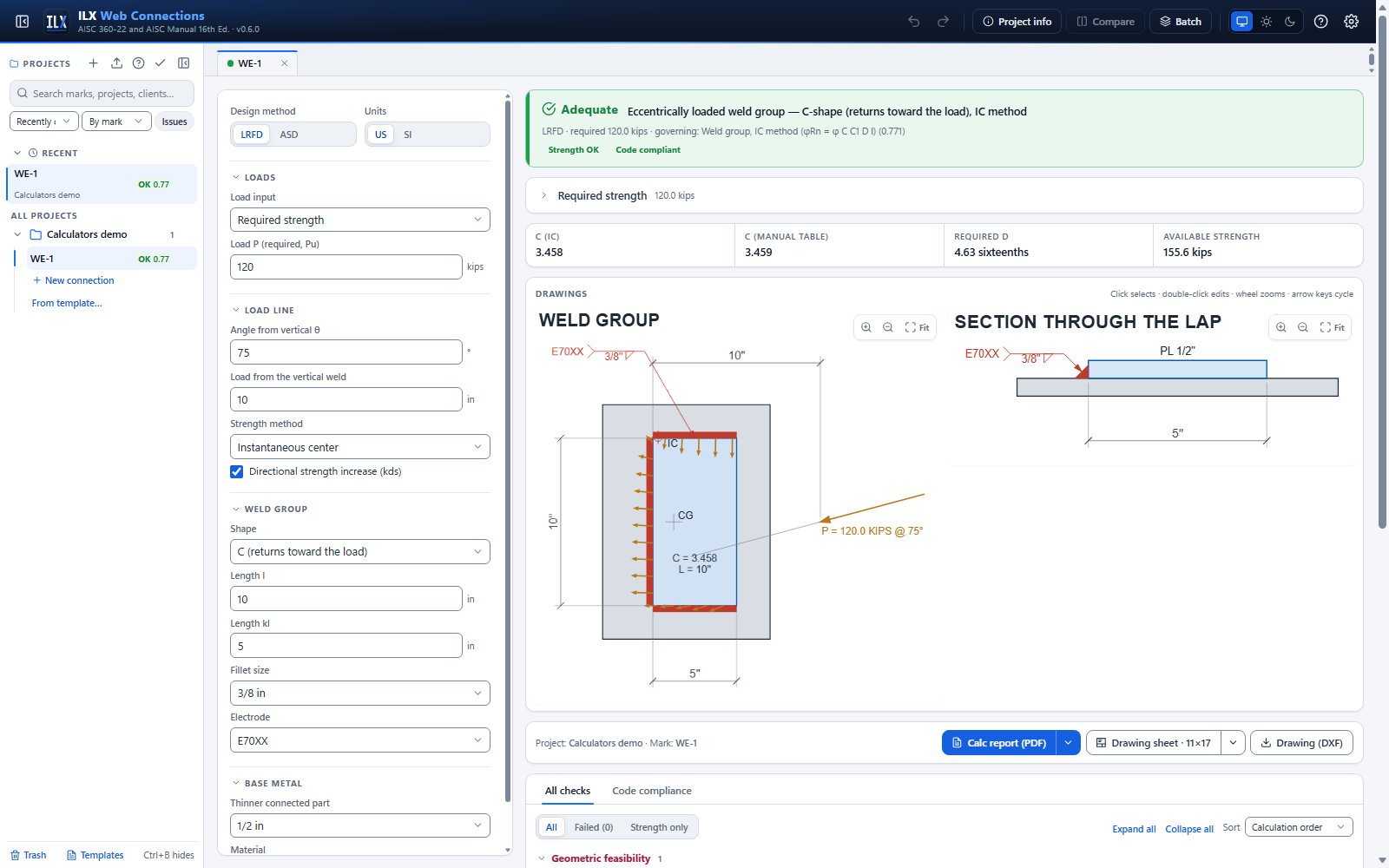
Choose a shape and enter its lengths l and kl, as the Manual table for that shape names them. The load line is x from the vertical weld at the centroid level, at θ from the vertical (positive θ turns the downward load clockwise, so it leans toward the vertical weld).
| Shape | l and kl | Manual table |
|---|---|---|
| Single line | l vertical | 8-4 (k = 0, one line = C/2) |
| Two vertical lines | l vertical, kl apart | 8-4 |
| Two horizontal lines | l = the spacing, kl = the line length (Table 8-5 names them the other way; ILX converts) | 8-5 |
| Box, l vertical | l tall, kl wide | 8-6 |
| Box, l horizontal | l wide, kl tall | 8-7 |
| C, returns toward / away from the load | l vertical, returns kl | 8-8 / 8-9 |
| L, return toward the load | l vertical, bottom return kl | 8-10 (θ ≤ 0), 8-10a (θ > 0) |
| L, return away from the load | l vertical, bottom return kl | 8-11 (θ ≥ 0), 8-11a (θ < 0) |
The L is the only unsymmetric shape, so the Manual tabulates both inclinations of the load: the "a" tables are the load leaning the other way. ILX picks the table from the sign of θ. For an L with the return at the top, change the sign of θ.
ILX solves the IC method with the directional strength increase (kds; it can be turned off) and gives:
- C, with Rn = C C1 D l (Manual Eq. 8-30);
- the required size Dmin;
- the Manual-table value, interpolated in k, a and the angle;
- the elastic-method strength (Manual Eqs. 8-11 to 8-17, with kds = 1.0).
It also checks the minimum and maximum fillet sizes, the minimum length (4w) and the base-metal thickness, tmin = 3.09 D / Fu.
Bolted joint calculator #
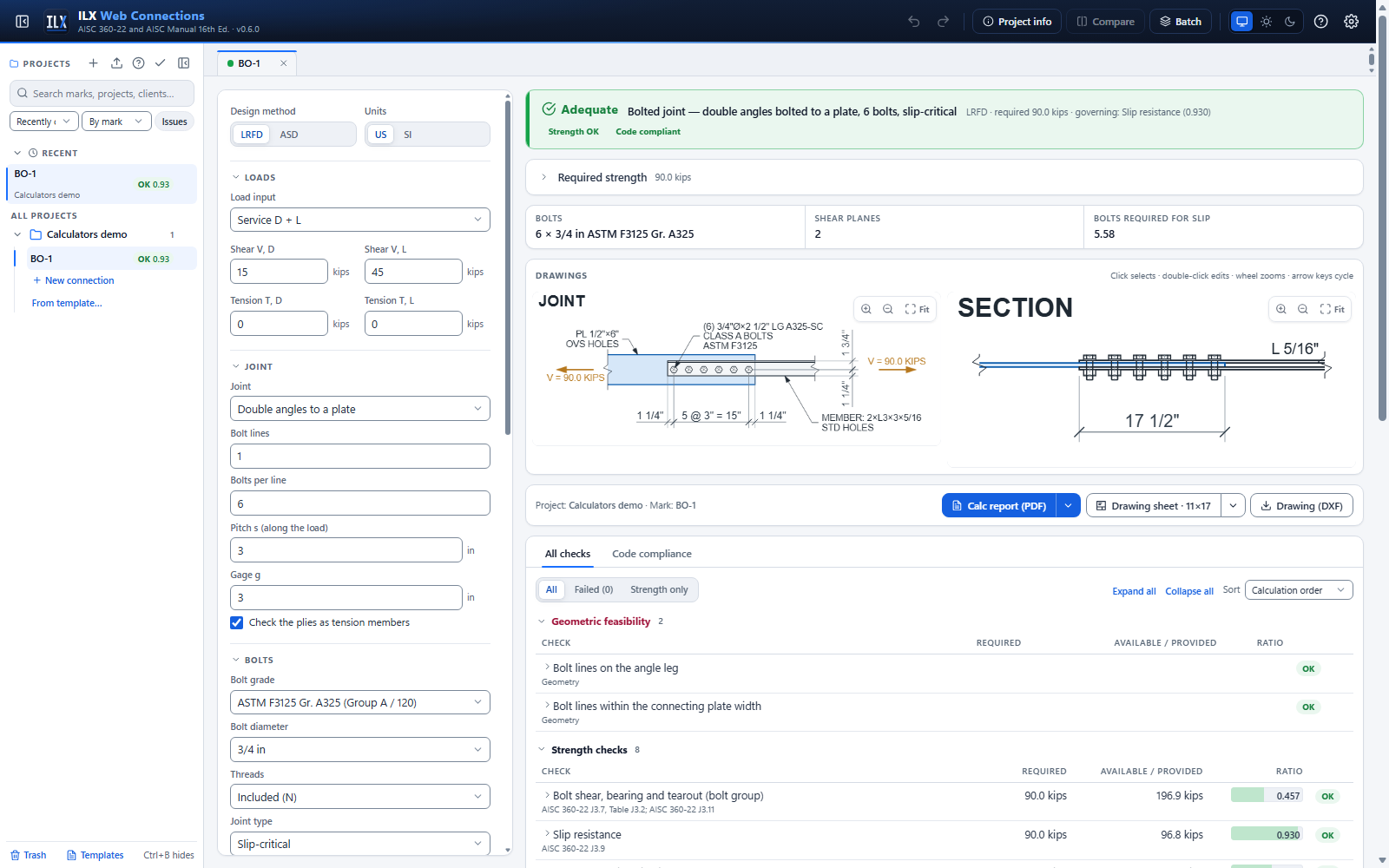
Pick the joint:
- a lap (single shear);
- a splice with two splice plates (double shear);
- a tee or flange joint, where the bolts carry tension and shear;
- double angles bolted to a plate (double shear).
The bolts lie in lines parallel to the load, with bolts per line at pitch s. Ply A is the member, which ends beyond the first bolt. Ply B is the connecting plate, which ends beyond the last bolt. Each ply tears out toward its own end.
| Check | Clause |
|---|---|
| Bolt shear, bearing and tearout: Σ of each bolt's least value | J3.7, J3.11 |
| Bolt tension, and combined tension and shear in bearing-type joints (F'nt; the 30 % exemption is applied) | J3.7, J3.8 |
| Slip resistance, with φ / Ω from the hole type relative to the load, the J3.10 factor ksc with tension, and the bolts required | J3.9, J3.10 |
| Fillers: the shear reduction for bearing-type joints, and hf for slip-critical joints | J5.2, J3.9 |
| Member and plate as tension members: yielding (Whitmore section for the plate), rupture with the shear-lag factor U, block shear (L and U blocks) | J4.1, D3, J4.3 |
| Spacing, edge distances with the Table J3.5 increments, maximum spacing and edge, hole use, pretension, washers | J3.3 to J3.6, RCSC 6 |
Slot directions are relative to the drawing, where the load is horizontal. Short slot, vertical is a slot perpendicular to the load (J.4A). Long slot, horizontal is parallel to it (J.4B).
Cyclic loading (fatigue) designs the joint for fatigue (Fatigue (Appendix 3)): both plies at the bolt holes under the shear (Table A-3.1 Case 2.1 or 2.2, or Case 1.5 for snug-tight joints) and the bolts in tension (Case 8.5, G).
Welded joint calculator #
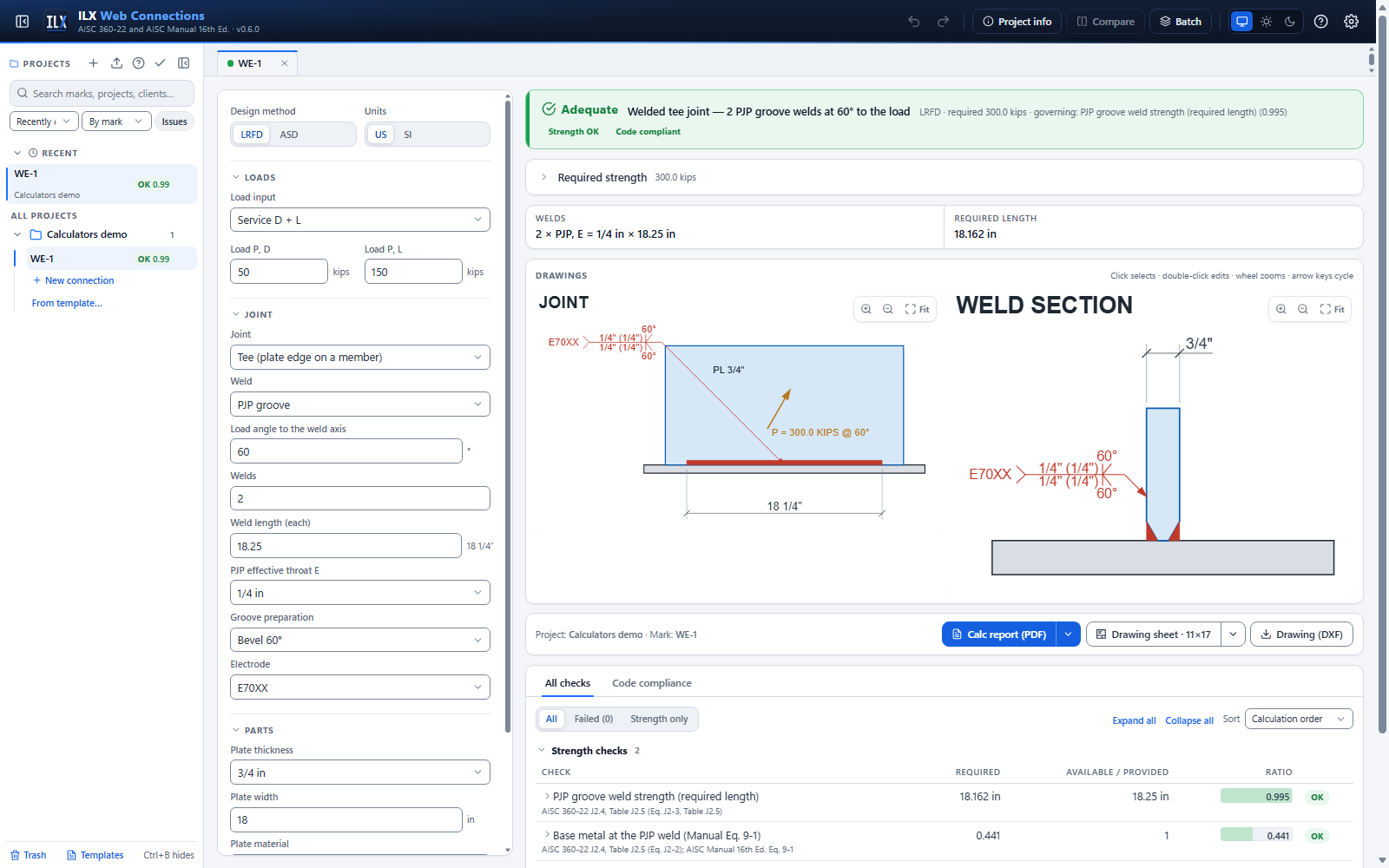
A lap joint has fillet welds along the edges of the lapped plate. A tee joint has fillet or PJP groove welds along the edge of a plate on a member. Enter the angle between the load and the weld axis: 0° is longitudinal and 90° is transverse.
- Fillet welds. The strength is 0.60 FEXX × 0.707w × kds (Eqs. J2-4, J2-5). Long end-loaded welds in a lap get the factor β (Eq. J2-1). ILX gives the strength per inch, the required length and the required size. The base metal is checked by shear rupture of the lapped plate (Eq. J2-2) or by the Manual Part 9 minimum thickness. The fillet size limits and the lap length (≥ 5t) are checked.
- PJP groove welds. Enter the effective throat E and the preparation. ILX checks the shear and tension strengths per inch (Table J2.5), combined for the load angle, and the base-metal interaction (Manual Eq. 9-1). It also checks the minimum throat (Table J2.3).
The drawings show the true weld cross-section and its AWS symbol, both from one weld definition.
Cyclic loading (fatigue) designs fillet-welded joints for fatigue (Fatigue (Appendix 3)): the fillets (Table A-3.1 Case 8.2, F) and the loaded plate at the weld ends (Case 4.1 for longitudinal welds, load angle under 45°; Case 5.7, C and C″, for transverse welds). PJP joints are not covered.
Pin-connected member / eyebar calculator #
Choose the member: a pin-connected plate (AISC 360-22 D5, Example D.7) or an eyebar (D6, Example D.8). Enter the thickness t, the width w (the plate width at the hole, or the eyebar body width), the pin diameter d and the hole diameter dh, the materials and the number of plies on the pin. Identical plies share the load equally.
- Pin-connected plate. Also enter the end distance a from the hole edge to the end of the plate and, when the corners are cut at 45°, the distance c from the hole edge to the cut. ILX checks tensile rupture on 2 t be with be = 2t + 0.63 in. (2t + 16 mm) and not more than b = (w − dh)/2 (Eq. D5-1), shear rupture on Asf = 2t (a + d/2) (Eq. D5-2), bearing on the projected area t d (Eq. J7-1) and yielding on w t (Eq. D2-1). The D5.2 limits are checked: w ≥ 2 be + d, a ≥ 1.33 be, c ≥ a and, when the pin moves under full load, dh ≤ d + 1/32 in.
- Eyebar. Also enter the head diameter dhead and the transition radius R. The head is concentric with the hole. ILX checks yielding of the body (w ≤ 8t) and the D6.2 limits: t ≥ 1/2 in. (unless external nuts snug the plies), d ≥ 7/8 w, dh ≤ d + 1/32 in., R ≥ dhead, b = (dhead − dh)/2 more than 2/3 w (and not counted beyond 3/4 w).
- Bearing uses the smaller yield stress of the plate and the pin. For an eyebar it is checked only when the pin is weaker, as the note to Example D.8 says.
- Not checked. The pin itself (shear and flexure), the clevis or gusset it bears on, and fatigue. Design Examples D.7 and D.8 do not check the pin either. ILX evaluates Eq. D5-2 with Cr = 1.0 only, so a hole more than 1/32 in. (1 mm) larger than the pin fails a geometry check.
The drawings show the plate or eyebar head with the pin, the widths b | dh | b, a or R, the corner cuts and the effective width, and a section through the pin with the plies, the connected parts and the shear planes.
Verification of the calculators #
Every listed Design Example is reproduced end to end, in LRFD and ASD, as an automated test. The results appear on the Verification page (see Verification).
One documented deviation remains, R1, in II.A-22. AISC rounds b' and λ before calculating the buckling stress, so ILX's Fcr and Nc come out about 1 % lower. The interaction ratio agrees within 0.5 %.
Calculator limits #
- The column under a bracket plate is not checked (flange bending, web local yielding), as in the Design Examples.
- Prying in tee and flange joints is not included: the bolt tension is T / n.
- Auto-design, batch design and Compare are not available for the calculators yet.
- Load cases (the Load cases load input) are entered through the API. The editor uses the required values when no cases are given.