
Designing a single-angle connection
A single-angle connection is a simple shear connection made of one angle on one side of the beam web. One leg, the support leg, is bolted to the support. The other leg, the outstanding leg (OSL), is bolted or welded to the beam web.
The calculation is the single-plate engine's angle path. Every check, field and output described here is shared with the single-plate connection, and only the angle-specific parts differ.
When to use a single angle #
- Use a single angle for light to moderate reactions where a one-sided, field-bolted connection is wanted, for example a beam framing into a girder web that must be erected from one side.
- Use a single plate when the element can be shop-welded to the support, or when the support is an HSS column (an angle bolted to an HSS wall is available, but the element is typically shop-welded to an HSS: Manual p. 10-96).
- Use a double angle for larger reactions or a symmetric connection.
- Use a shear tee when the element should be bolted to the support on both sides of the beam web line.
Creating a single angle in the wizard #
- In the wizard's Connection type step, select the Angle card in the Simple shear group, then Single angle under Angle type.
- Under Joint type, select Beam to column flange, Beam to column web, Beam to girder web or Beam to HSS column. On an HSS column the angle's support leg is bolted to the HSS wall (see Bolted to an HSS wall); the card that welds the angle to the support is greyed out.
- Under Configuration, select a card:
| Card | Sets | Basis |
|---|---|---|
| All-bolted angle | Support leg bolted, outstanding leg bolted to the beam web (Bolt / Bolt) | Manual Part 10, single-angle connections; Design Example II.A-28 |
| Bolted / welded angle | Support leg bolted, outstanding leg welded to the beam web (Bolt / Weld) | Manual Part 10, single-angle connections |
- Members. Enter the Connection mark (new marks are numbered SA-1, SA-2 and so on), the Supported beam, the Column or Girder, and the Angle.
- Loads. Choose Service D + L (Dead RD, Live RL) or Required strength (Shear Ru or Ra, and Axial, + for tension). The other load modes are in the editor.
- Tick Auto-design the connection (bolts, angle, weld) for these loads to size the connection as it is created. The wizard keeps the beam, the support, the joint type and the configuration.
- Select Create.
Saved single-plate connections that used an angle (Bolt / Bolt or Bolt / Weld) in earlier versions open as single-angle connections. Their inputs and results are unchanged.
Inputs in the editor #
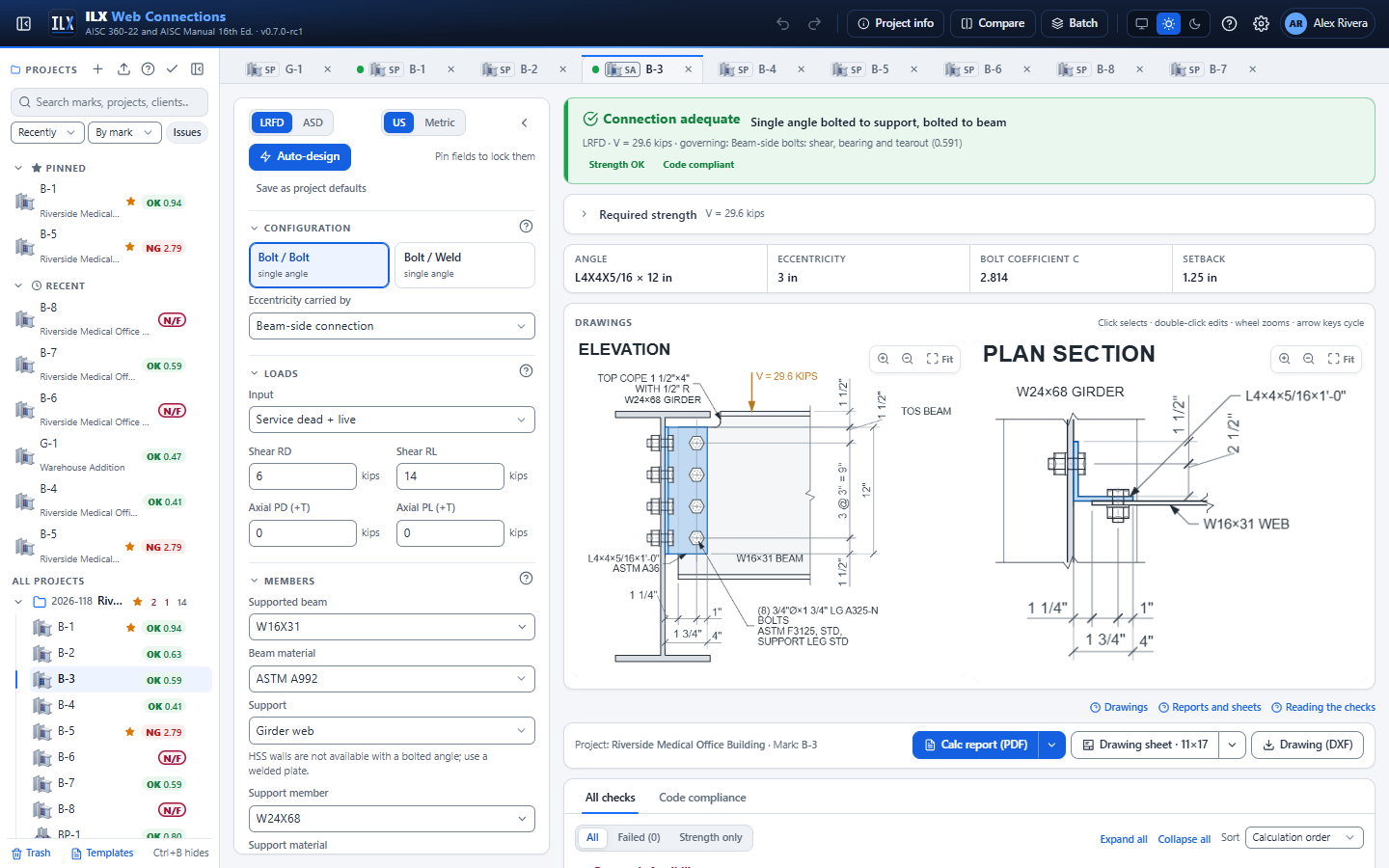
The single-angle editor is the single-plate editor on the angle path. The sections, in order, are Configuration, Loads, Members, Angle, Beam copes, Bolts, Angle geometry, Welds, Service conditions and Additional checks. This page covers what differs from the single plate; the shared sections link to the single-plate page.
Angle configuration #
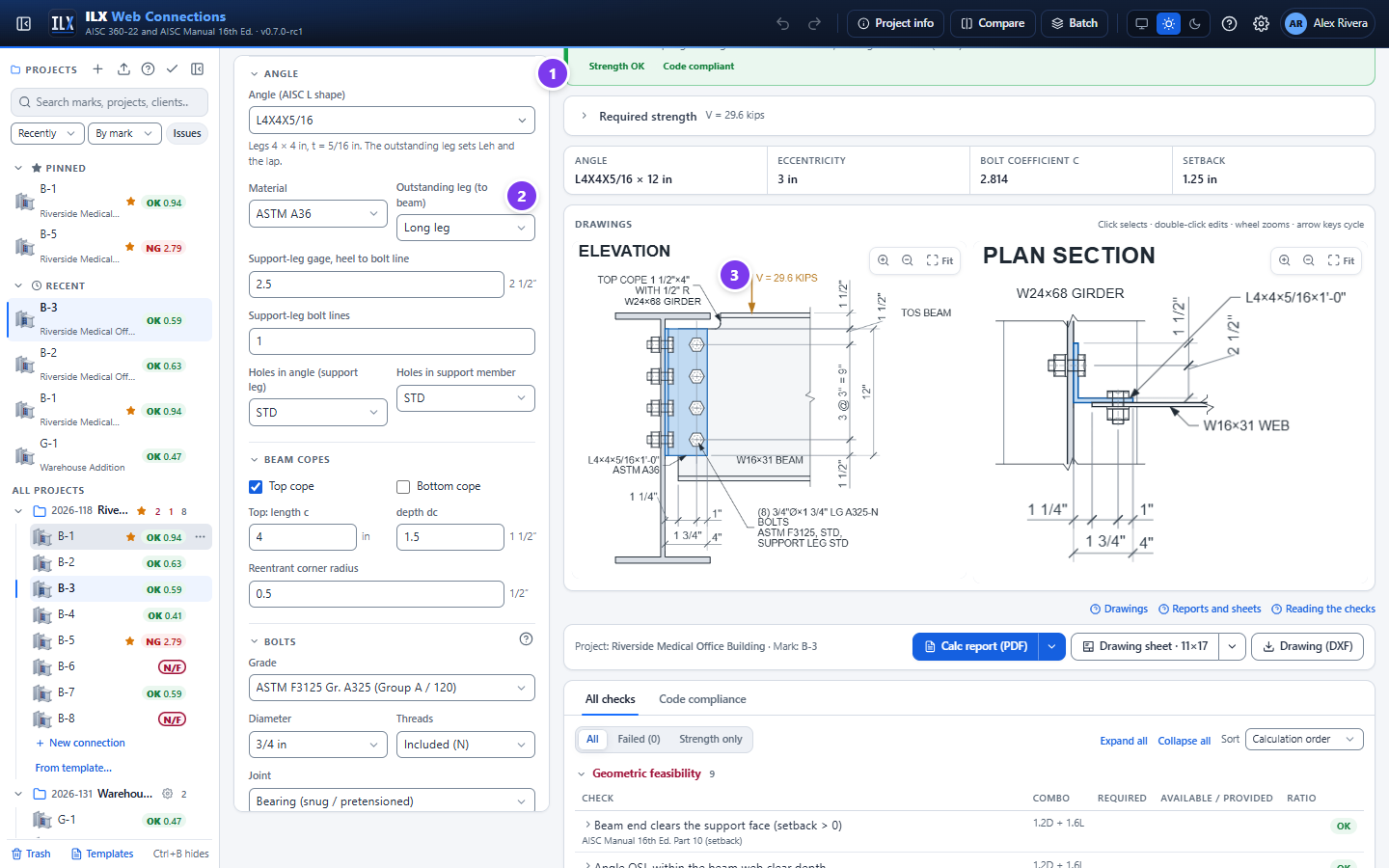
- The Angle section holds the angle fields (see below).
- Outstanding leg (to beam): Long leg or Short leg.
- The drawing shows the angle's support leg edge-on. A top cope is drawn with its radiused reentrant corner.
The Configuration section has two buttons, Bolt / Bolt and Bolt / Weld. The first word is the support side, the second the beam side; both read single angle.
The section also shows Eccentricity carried by. For an angle it does not change the design: ILX always takes the eccentricity on the beam side (see Eccentricity).
Members and support #
The Members section is the single plate's (see Members and supports), with two differences:
- Support also offers HSS column wall when the support leg is bolted; Bolts into the HSS and, for blind bolts, the manufacturer's strength then appear (see Bolted to an HSS wall). With the angle welded to the support, HSS walls are not offered.
- Connections on both sides of the web is not shown.
Girder TOS − beam TOS works as for the single plate: ILX checks that the beam's top flange clears the girder flange and proposes a cope if it does not.
Beam end braced (Spec. Appendix 6.3) with Cb, plate flexure with the beam end not braced (Configuration section) and Connection near the column end (column web or column flange) work as for the single plate: see Connection type and Members and supports.
The angle #
| Field | Meaning |
|---|---|
| Angle (AISC L shape) | Any AISC L shape. The line under it gives the legs and the thickness, and reminds you that the outstanding leg sets Leh and the lap. |
| Material | The angle material (A36, A572 Gr. 50 and so on) |
| Outstanding leg (to beam) | Long leg or Short leg. For an unequal-leg angle, the drawings call it LLO or SLO. |
| Support-leg gage, heel to bolt line | g, from the heel of the angle to the first support-leg bolt line |
| Support-leg bolt lines | 1 or 2 vertical bolt lines in the support leg |
| Line spacing | The spacing of the two support-leg lines (2 lines only) |
| Holes in angle (support leg), Holes in support member | STD, OVS, SSL or LSL, horizontal or vertical. Manual p. 10-59 requires standard holes in the angle leg to the support ("to facilitate erection and provide torsional resistance"): any other hole type there fails the detailing check Single angle: standard holes in the leg to the support. For the leg to the beam the Manual says the holes "can be standard holes or horizontal short slots": other holes there (Angle holes (beam leg)) get the recommendation Single angle: standard or horizontal short-slotted holes in the leg to the beam. |
The beam-leg holes (Angle holes (beam leg), Beam web holes) are in the Bolts section.
Beam copes #
As for the single plate; see Beam copes.
Bolts and holes for the angle #
The Bolts section is the single plate's (see Bolts and holes): grade, diameter, threads, bearing or slip-critical, Rows, n and Spacing, s, the bolt group method and the hole-deformation option. The same rows and spacing apply to both legs.
- Bolt / Bolt: Beam-side columns (1 to 3) and Gage, Angle holes (beam leg) and Beam web holes, and Filler between plate and beam web.
- Bolt / Weld: only the support-leg bolts. The beam-side fields are hidden.
Angle geometry #
| Field | Meaning |
|---|---|
| Lev, angle (top & bottom) | Vertical edge distance at the top and bottom bolts. The angle length follows from n, s and Lev. |
| Top of beam to top of angle | Where the angle sits on the web. It must clear the flange, fillet and any cope. |
| Heel to first beam bolt column, a | Bolt / Bolt: the distance from the heel to the first beam-side bolt column |
| Leh, beam web | Bolt / Bolt: horizontal edge distance on the beam web. The angle's beam-side Leh follows from the leg width and a. |
| Angle heel to beam end (setback) | Bolt / Weld: the gap between the support face and the beam end |
| K (plate in compression) | Shown when the net axial load (PD + PL + P) is compressive |
There is no thickness field: the thickness is the angle's.
Welds (Bolt / Weld) #
| Field | Meaning |
|---|---|
| Fillet, angle to beam web | The fillet weld from the outstanding leg to the beam web |
| Weld shape | C-shape, Vertical or Top & bottom. The eccentric weld group uses the instantaneous-center method of Manual Part 8. |
| Lap weld | Plate edges or + Beam end. Compare designs the other option and shows both governing ratios. |
| Electrode | E70XX or E80XX |
There is no weld to the support: the support leg is always bolted.
Loads, service conditions and additional checks #
The Loads section is the shared one; see Loads and load combinations. All four input modes are supported, with axial tension or compression. Axial tension puts the support-leg bolts in tension, and ILX checks them for combined tension and shear with prying.
Service conditions and Additional checks (structural integrity, end rotation) are as for the single plate; see Service conditions and additional checks. Cyclic loading designs the angle for fatigue (Fatigue (Appendix 3)): the angle legs and the beam web at the bolt holes, the angle-to-web welds when welded, the angle-to-support welds when welded, and a cope corner.
Checks for single angles #
The checks are the single-plate checks with the angle legs as the connected elements. Read them as described in Checks and compliance.
Eccentricity #
- Beam side (Bolt / Bolt). The beam-side bolt group carries the full eccentricity, with the load at the support line (the heel). Eccentricity carried by is ignored for angles.
- Support leg. The reaction acts in the plane of the beam web, so the support-leg bolt group also carries an in-plane eccentricity of g + tw/2.
Both bolt groups are solved by the instantaneous-center method (Manual Part 7) at the true load angle.
Bolt checks #
| Check | Reference |
|---|---|
| Beam-side bolts: shear, bearing and tearout (Bolt / Bolt) | Manual Part 7 (instantaneous center); AISC 360-22 J3.11 |
| Support-leg bolts: shear, bearing and tearout, with the support ply (column flange, column web or girder web) | Manual Part 7; J3.11 |
| Support-leg bolts: tension with shear and prying (axial tension) | J3.7, Table J3.2; J3.8; Manual Part 9 (prying action) |
| Slip resistance (slip-critical joints) | J3.9 |
Angle leg checks #
| Check | Reference |
|---|---|
| Angle OSL shear yielding, shear rupture and block shear (beam-side bolts) | J4.2(a), J4.2(b), J4.3 |
| Angle OSL block shear under axial load (U-shape, L-shape) and its interaction with shear | J4.3; Design Example II.A-1B |
| Angle OSL tension yielding and rupture (U = 1.0) | J4.1(a), J4.1(b) |
| Angle OSL flexural yielding + shear interaction at the first beam bolt column (Bolt / Bolt) or at the beam end (Bolt / Weld) | Manual Part 12, Eqs. 12-2 and 12-3; Manual Part 10, Eq. 10-8 (welded beam side) |
| Angle OSL flexural rupture + shear interaction (Bolt / Bolt) | J4.5; Manual Part 9; Manual Part 12 |
| Angle OSL flexural buckling (shown as not controlling when λ ≤ 0.7) | Manual Part 9 |
| Angle OSL tp ≤ tmax (beam-side bolts, ductility) | Manual Part 10, extended configuration (tmax) |
| Angle support leg shear yielding, shear rupture and block shear | J4.2(a), J4.2(b), J4.3 |
| Fy Z ≤ Fu Znet (advisory) | Manual Part 10 (rotational ductility) |
Weld checks (Bolt / Weld) #
- Welds to beam web by the IC method (J2.4, Table J2.5; Manual Part 8).
- Minimum and maximum fillet size, lap ≥ 5 × the thinner part and ≥ 1 in., horizontal weld length ≥ 4w, effective length and terminations (J2.2b).
- Beam web thickness develops the welds and Angle OSL thickness develops the beam welds (Manual Part 9, minimum supporting thickness).
Beam and support checks #
- Beam web shear (G2.1), or the coped section in shear yielding and rupture and block shear (J4.2, J4.3).
- Beam tension yielding and rupture under axial load (D2, D3).
- Coped beam local flexure (Dowswell 2018) and flexural rupture through the bolt holes (J4.5).
- Girder web supports: Support web punching shear and Support web yield-line strength under axial load (J10.10; Manual Part 9).
Detailing and feasibility checks #
- Bolt spacing (J3.4, J3.6) and edge distances on the angle legs and the beam web, including the support leg's vertical and toe edge distances (J3.5, Table J3.4).
- Support-leg gage clears the angle fillet (g ≥ k + d) and Bolt tightening clearance to the support (Manual Part 7, Tables 7-15 and 7-16).
- The angle sits within the beam web clear depth, the bolts lie in the angle legs and on the support, and the holes stay inside the angle. Any failure makes the connection NOT FEASIBLE.
- Angle OSL depth ≥ T/2 (beam stability), at least two bolts, element thickness ≥ 1/4 in. and setback ≥ ½ in. (recommendations).
Sloped beam #
Beam slope (Skew and slope section, default 0) works as for the single plate: the strength checks are those of the square connection (Manual p. 10-90). ILX adds a check that the angle fits between the sloped flanges, and a note. See Skewed plate and sloped beam. A skewed single angle is not a Manual variant; use the skewed bent-plate type.
Bolted to an HSS wall #
With Support = HSS column wall and the support leg bolted (All-bolted angle or Bolted / welded angle), the support-leg bolts go into the wall of a rectangular HSS. This is the less common case: with HSS columns the connecting element is typically shop-welded to the HSS and bolted to the beam (Manual 16th Ed. p. 10-96), so consider a single plate first. An angle welded to an HSS wall is not available.
Inputs (Members section, shown only for a bolted support leg on an HSS wall)
| Field | Default | Notes |
|---|---|---|
| Bolts into the HSS | Through-bolts | Through-bolts (snug-tight, J3.11b): long bolts through the whole tube, both walls (Manual p. 7-12). Blind bolts (manufacturer, J3.12): special fasteners installed from one side (Manual p. 7-13). |
| Blind bolt available strength per fastener (manufacturer) | 0 | Blind bolts only: the manufacturer's available shear strength per fastener in the design method you use (φRn for LRFD, Rn/Ω for ASD), in kips or kN. 0 fails the design until you enter it. |
Checks
- Through-bolts: each support-leg bolt takes the least of the bolt shear (Table J3.2, single shear at the angle/HSS interface), the angle bearing and tearout (J3.11a), and the HSS wall bearing and tearout of Spec J3.11b: bearing Rn = 1.8 Fy d t (J7, Eq. J7-1, φ = 0.75, Ω = 2.00) and tearout 1.2 lc t Fu (Eq. J3-6g; 1.5 lc t Fu, Eq. J3-6h, when deformation is not a design consideration; 1.0 lc t Fu, Eq. J3-6i, for long slots perpendicular to the force). t is the HSS design wall thickness, Fy and Fu those of the HSS material; the wall tears out only between holes (the column is continuous). The group then takes the eccentricity g + tw/2 as before.
- Through-bolts are snug-tight only: the flexibility of the HSS walls precludes pretensioning (Manual p. 7-12). A Pretensioned or Slip-critical joint fails.
- The bolt grip is the angle leg plus the whole HSS depth across the connected face. Long bolts may need ASTM A449 (Manual p. 7-12).
- Blind bolts: each bolt takes the least of your manufacturer value, the HSS wall bearing and tearout (J3.11a with the design wall thickness) and the angle bearing and tearout, with the bolt value labelled as manufacturer's data (J3.12).
- Both kinds: every hole must lie on the flat of the connected HSS face, or the hole check fails (NG). A bolted leg whose toe runs past the flat gets a recommendation (it would sit on the corner radius). Axial tension through the bolts into the HSS wall fails: Spec J3.13 needs a rational analysis of the wall, which ILX does not model.
Gaps. The HSS-wall limit states of a blind bolt (tear-out of the bolt in tension, wall distortion) are the manufacturer's: confirm them with the product literature. Through-bolts pass through both walls: coordinate them with any connection on the opposite face. Round HSS is not available (a flat leg cannot bolt to a curved wall).
The drawing shows through-bolts crossing the tube with the nut on the far wall; the bolt callout gives the support-leg bolt length and adds THROUGH-BOLTS, SNUG-TIGHT (AISC 360 J3.11b) or BLIND BOLTS PER MANUFACTURER (AISC 360 J3.12).
Single-angle drawings, report and sheet #
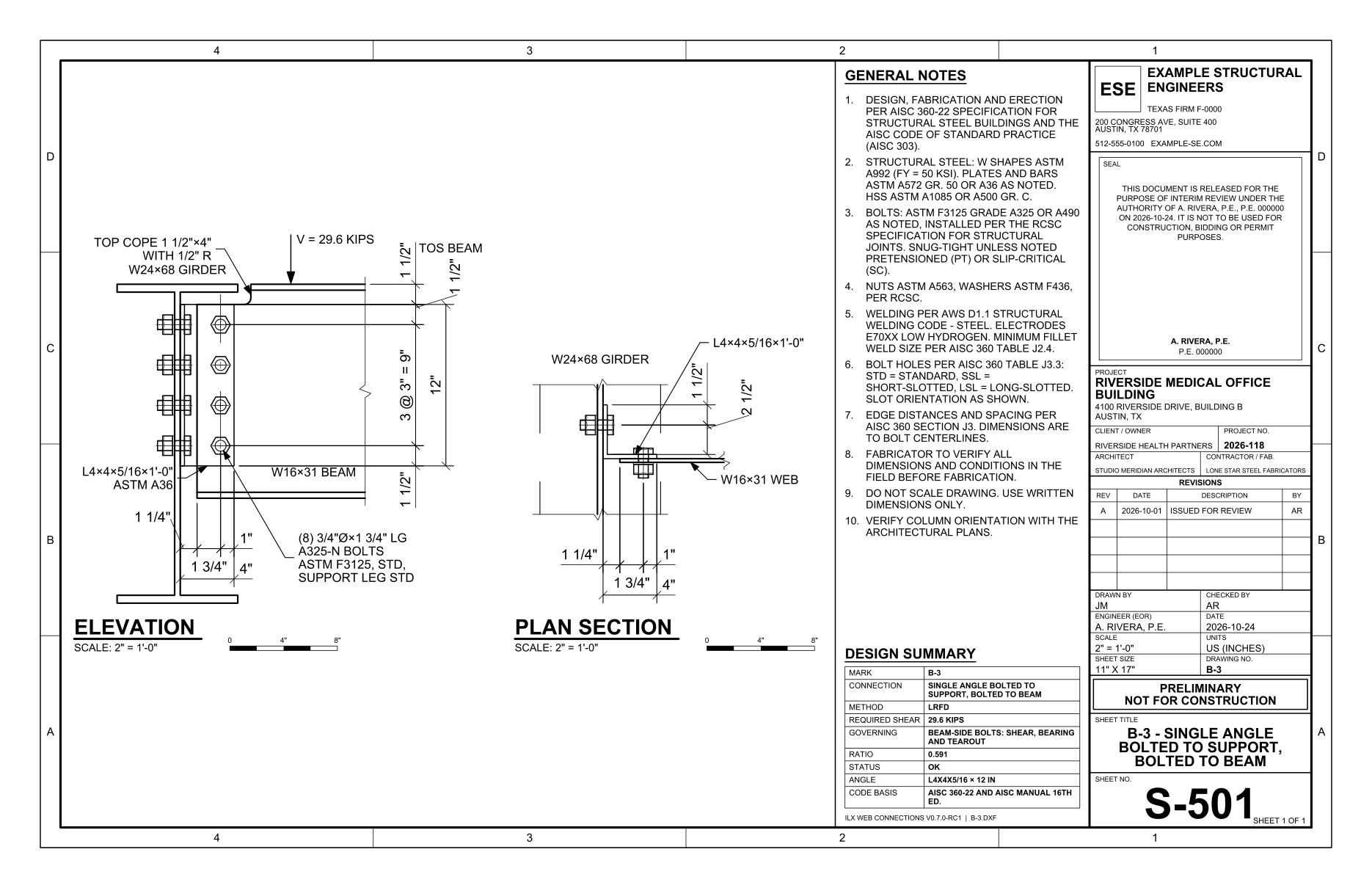
The drawings are the single plate's: an elevation, with the support leg edge-on, and a plan section. The angle is called out with its size and length, plus the leg orientation (LLO or SLO) for an unequal-leg angle. The report is titled Single-Angle Shear Connection, and the sheet's design summary labels the element ANGLE.
Auto-design for single angles #
Auto-design uses the single-plate search on the angle path. It searches:
- the bolt count, diameter and grade;
- the angle (AISC L shapes with 3 to 6 in. legs, lightest first) and, for unequal legs, the outstanding leg;
- the beam weld (Bolt / Weld);
- the distance a and the support-leg gage, fitted to the leg widths.
Holes, spacing, members and loads are never changed. The support and beam sides stay as chosen, so an angle never becomes a plate. The dialog, objectives and pins work as for the single plate; see Auto-design, compare and batch. Batch design (default columns beam, support, RD, RL) and compare also work.
Limitations and documented deviations #
- HSS supports: bolted support leg only. On a rectangular HSS wall the support leg is through-bolted or blind-bolted, without axial tension; see Bolted to an HSS wall. A welded single plate is the usual choice.
- The support leg is always bolted. An angle welded to the support and bolted to the beam is not modelled. The Bolted / welded angle card is the reverse: bolted to the support, welded to the beam web.
- Verification.
- Design Example II.A-28A (all-bolted angle to a girder web) is reproduced, OK in LRFD and ASD.
- In Design Example II.A-29, the angle is welded to the column flange and bolted to the beam, so only its angle element checks (shear yielding, shear rupture, block shear) are compared.
See Verification.
- Eccentricity (II.A-28A). ILX applies e = g + tw/2 on the support leg and e = a on the beam leg. The example neglects the beam-leg eccentricity because it is less than 3 in. (Manual Fig. 10-15). ILX's support-leg value is 10 % higher and its beam-leg value 20 % lower, and the governing strength agrees within 0.3 %. This is an open decision.
- Beam-web edge bolt (II.A-28A). The example conservatively uses le = 1¼ in. instead of the drawn 1½ in., so ILX's per-bolt value is higher.
- Prying of angle support legs in tension is computed by Manual Part 9, but no published example has been found to verify it.
- Bolt / Weld has no published example reproduced end to end.